IDE: orders & exits
Open and close positions, size them, set stops and take-profits, and write entry conditions.
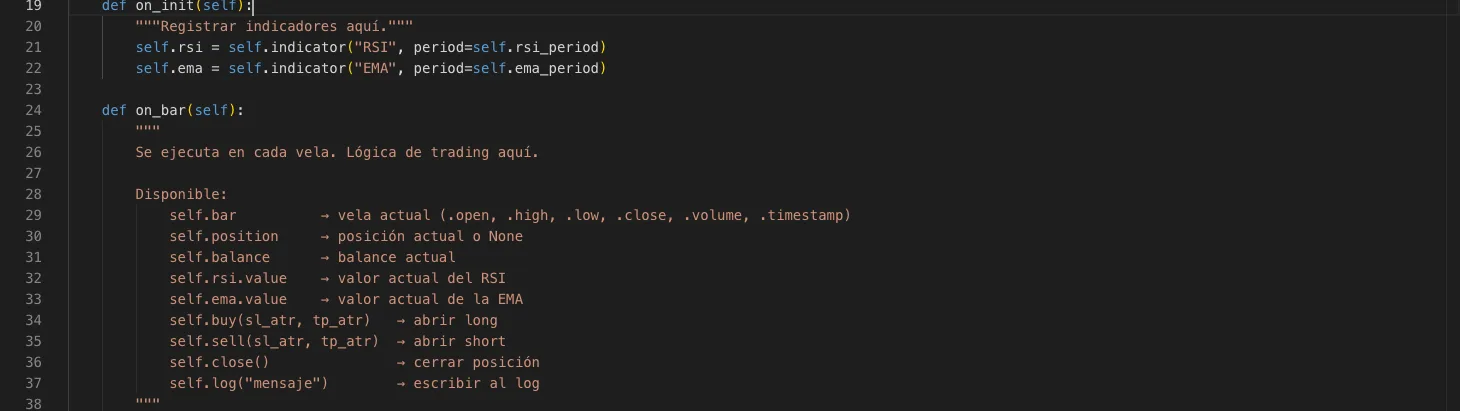
Here is the API for trading from your code: open long or short positions, size them correctly, assign stops and targets, and close them whenever you want. All methods are available inside your strategy class.
Open a position
`self.buy(...)` opens a long position (buy) and `self.sell(...)` opens a short position (sell). Both methods accept the same arguments for sizing and setting exits.
self.buy(sl_atr=1.5, tp_atr=3.0)    # largo con SL a 1.5*ATR y TP a 3*ATR
self.sell(sl_atr=1.5, tp_atr=3.0) # cortoPosition size (required: choose one)
You must indicate how to calculate the size of each order using one of these three arguments. If you don't include any, the order doesn't know how much to risk and won't execute.
| Argument | What it does | Example |
|---|---|---|
| lots=0.1 | Fixed lots, regardless of balance or volatility. | lots=0.05 |
| risk_pct=0.02 | Risks 2% of the balance. Calculates lots automatically based on the distance to SL. | risk_pct=0.01 |
| risk_usd=100 | Risks exactly 100 fixed USD per trade. | risk_usd=50 |
self.buy(sl_atr=1.5, tp_atr=3.0, lots=0.1)
self.buy(sl_atr=1.5, tp_atr=3.0, risk_pct=0.02)
self.buy(sl_atr=1.5, tp_atr=3.0, risk_usd=100)`risk_pct` is the most recommended option: it keeps risk constant even if the balance or instrument volatility changes. There is also `self.sizer` with `fixed`, `risk_percent`, `risk_currency` and `kelly` methods for advanced lot sizing when you need more complex logic.
Stops and take-profits: exit modes
By default, ATR multiples are used with `sl_atr` and `tp_atr`, but you can pass an `exit_mode` argument to change the exit behavior. Each mode has its own parameters.
| Mode | Use case | Parameters |
|---|---|---|
| atr (default) | SL and TP as multiples of the current ATR. | sl_atr, tp_atr |
| fixed_pips | Fixed distances in pips. | slPips, tpPips |
| percent | SL and TP as a percentage of the entry price. | slPct, tpPct |
| trailing_atr | Trailing stop that follows the price as it moves in your favor. | trailAtr |
| breakeven | Moves the SL to the entry price when the position gains X ATR. | beActivationAtr (+ sl_atr, tp_atr for the initial SL/TP) |
| structure | SL at the low (or high for shorts) of the last N bars. | lookback (+ tp_atr for the target) |
| time_exit | Automatically closes the position after N bars. | maxBars (+ sl_atr for protection) |
| partial_tp | Closes a percentage of the position at TP1, the rest at TP2. | tp1Atr, tp2Atr, partialPct |
# ATR (por defecto)
self.buy(sl_atr=1.5, tp_atr=3.0)

# Pips fijos
self.buy(exit_mode={"type": "fixed_pips", "slPips": 20, "tpPips": 40})

# Porcentaje del precio
self.buy(exit_mode={"type": "percent", "slPct": 1.0, "tpPct": 2.0})

# Trailing stop (persigue al precio)
self.buy(exit_mode={"type": "trailing_atr", "trailAtr": 1.5})

# Breakeven (mueve el SL a entrada al ganar X*ATR)
self.buy(exit_mode={"type": "breakeven", "beActivationAtr": 1.0}, sl_atr=2.0, tp_atr=4.0)

# Estructura (SL en el mínimo de las últimas N velas)
self.buy(exit_mode={"type": "structure", "lookback": 10}, tp_atr=3.0)

# Salida por tiempo (cierra tras N velas)
self.buy(exit_mode={"type": "time_exit", "maxBars": 20}, sl_atr=2.0)

# TP parcial (cierra parte en TP1, resto en TP2)
self.buy(exit_mode={"type": "partial_tp", "tp1Atr": 1.5, "tp2Atr": 3.0, "partialPct": 50})Close positions
| Method | What it closes |
|---|---|
| self.close() | The first open position. |
| self.close(position_id=N) | A specific position identified by its ID. |
| self.close_all() | All open positions. |
| self.close_longs() | Only long positions (buys). |
| self.close_shorts() | Only short positions (sells). |
| self.get_position(id) | Returns the object of an open position by its ID. |
| self.get_positions_by_tag(tag) | Returns all positions that have the specified tag. |
Writing entry and exit conditions
Conditions are plain Python: you compare indicator values and prices using standard operators. The table below shows the most common patterns.
| You want to detect | How to write it |
|---|---|
| Price above the EMA | self.bar.close > self.ema.value |
| RSI in oversold territory | self.rsi.value < 30 |
| Bullish price/EMA crossover | self.data.close.crossover(self.ema.value) |
| Bearish price/EMA crossunder | self.data.close.crossunder(self.ema.value) |
| Bullish MACD crossover of its signal line | self.macd.prev < self.macd.signal and self.macd.value > self.macd.signal |
| Breakout above the 20-bar high | self.bar.close > self.data.high.highest(20) |
def on_bar(self):
    tendencia_alcista = self.bar.close > self.ema.value
    momentum_ok = self.rsi.value < 35
    if not self.in_position and tendencia_alcista and momentum_ok:
self.buy(sl_atr=1.5, tp_atr=3.0, risk_pct=0.01)Multiple positions at once (advanced)
By default your strategy works with a single active position. If you want to manage several at once, set `max_positions` on the class and use the `position_count` property to control it. Tags (`tag`) help you group them and find them later.
class MiBot(Strategy):
    max_positions = 3

    def on_bar(self):
        if self.position_count < self.max_positions and self.entrada():
            self.buy(sl_atr=1.5, tag="scalp", risk_pct=0.01)
        for p in self.get_positions_by_tag("scalp"):
            if p.pnl_pct > 0.015:
self.close(position_id=p.id)If you don't specify `lots`, `risk_pct` or `risk_usd`, the order doesn't know how much to risk and won't execute. Always choose one of the three before running your first test.
Use `self.log("...")` to leave debug traces and understand why your bot entered or exited at a specific moment when you review the backtest.
To learn how to tune your strategy's behavior with configurable parameters and review the trade history, continue with the article «IDE: parameters, validation & history».